> ## Documentation Index
> Fetch the complete documentation index at: https://docs.bytebot.ai/llms.txt
> Use this file to discover all available pages before exploring further.
# Agent System
> The AI brain that powers your self-hosted desktop automation
## Overview
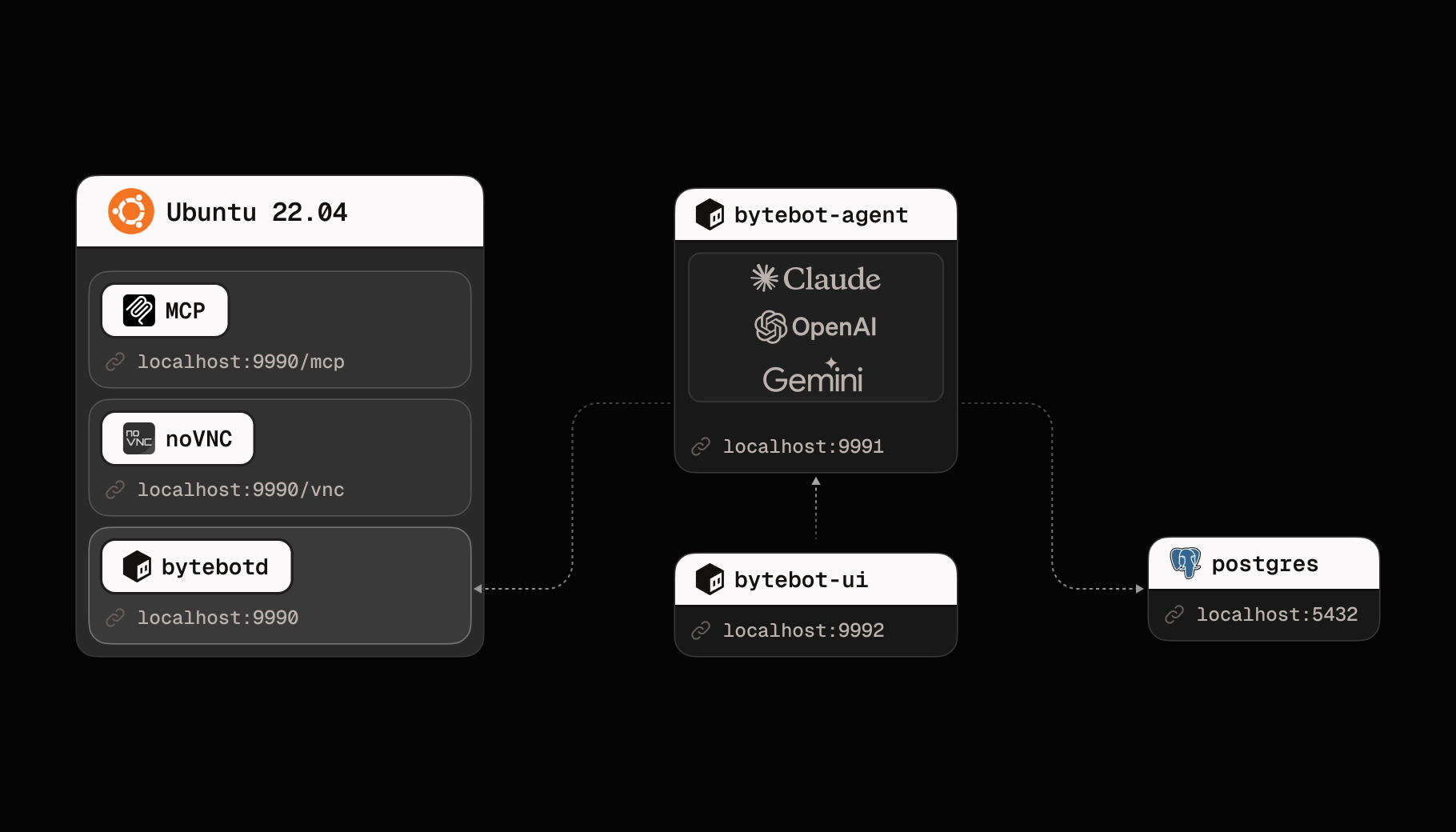
The Bytebot Agent System transforms a simple desktop container into an intelligent, autonomous computer user. By combining Claude AI with structured task management, it can understand natural language requests and execute complex workflows just like a human would.
 ## How the AI Agent Works
### The Brain: Multi-Model AI Integration
At the heart of Bytebot is a flexible AI integration that supports multiple models. Choose the AI that best fits your needs:
**Anthropic Claude** (Default):
* Best for complex reasoning and visual understanding
* Excellent at following detailed instructions
* Superior performance on desktop automation tasks
**OpenAI GPT Models**:
* Fast and reliable for general automation
* Strong code understanding and generation
* Cost-effective for routine tasks
**Google Gemini**:
* Efficient for high-volume tasks
* Good balance of speed and capability
* Excellent multilingual support
The agent with any model:
1. **Understands Context**: Processes your natural language requests with full conversation history
2. **Plans Actions**: Breaks down complex tasks into executable computer actions
3. **Adapts in Real-time**: Adjusts its approach based on what it sees on screen
4. **Learns from Feedback**: Improves task execution through conversation
### Conversation Flow
"Research competitors for my SaaS product and create a comparison table"
The AI model understands the request and plans: open browser → search → visit sites → extract data → create document
The agent controls the desktop: clicking, typing, taking screenshots, reading content
Real-time status updates and asks for clarification when needed
Completes the task and provides the output (files, screenshots, summaries)
## Task Management System
### Task Lifecycle
Tasks move through a structured lifecycle:
```mermaid theme={null}
graph LR
A[Created] --> B[Queued]
B --> C[Running]
C --> D[Needs Help]
C --> E[Completed]
C --> F[Failed]
D --> C
```
### Task Properties
Each task contains:
* **Description**: What needs to be done
* **Priority**: Urgent, High, Medium, or Low
* **Status**: Current state in the lifecycle
* **Type**: Immediate or Scheduled
* **History**: All messages and actions taken
### Smart Task Processing
The agent processes tasks intelligently:
1. **Priority Queue**: Urgent tasks run first
2. **Error Recovery**: Automatically retries failed actions
3. **Human in the Loop**: Asks for help when stuck
4. **Context Preservation**: Maintains conversation history across sessions
## Real-world Capabilities
### What the Agent Can Do
* Browse websites
* Fill out forms
* Extract data
* Download files
* Monitor changes
* Create documents
* Edit spreadsheets
* Generate reports
* Organize files
* Convert formats
* Access webmail through browser
* Read and extract information
* Fill contact forms
* Navigate communication portals
* Handle verification flows
* Extract from PDFs
* Process CSV files
* Create visualizations
* Generate summaries
* Transform data
## Technical Architecture
### Core Components
1. **NestJS Agent Service**
* Integrates with multiple AI provider APIs (Anthropic, OpenAI, Google)
* Handles WebSocket connections
* Coordinates with desktop API
2. **Message System**
* Structured conversation format
* Supports text and images
* Maintains full context
* Enables rich interactions
3. **Database Schema**
```sql theme={null}
Tasks: id, description, status, priority, timestamps
Messages: id, task_id, role, content, timestamps
Summaries: id, task_id, content, parent_id
```
4. **Computer Action Bridge**
* Translates AI decisions to desktop actions
* Handles screenshots and feedback
* Manages action timing
* Provides error handling
### API Endpoints
Key endpoints for programmatic control:
```typescript theme={null}
// Create a new task
POST /tasks
{
"description": "Your task description",
"priority": "HIGH",
"type": "IMMEDIATE"
}
// Get task status
GET /tasks/:id
// Send a message
POST /tasks/:id/messages
{
"content": "Additional instructions"
}
// Get task history
GET /tasks/:id/messages
```
## Chat UI Features
The web interface provides:
### Real-time Interaction
* Live chat with the AI agent
* Instant status updates
* Progress indicators
* Error notifications
### Visual Feedback
* Embedded desktop viewer
* Screenshot history
* Action replay
* Task timeline
### Task Management
* Create and prioritize tasks
* View active and completed tasks
* Export conversation logs
* Manage task queues
## Security & Privacy
### Data Isolation
* All processing happens in your infrastructure
* No data sent to external services (except your chosen AI provider API)
* Conversations stored locally
* Complete audit trail
### Access Control
* Configurable authentication
* API key management
* Network isolation options
## Extending the Agent
### Integration Points
* External API calls via the Agent API
* Custom AI prompts for specialized workflows
* MCP protocol support for tool integration
### Best Practices
1. **Clear Instructions**: Be specific about desired outcomes
2. **Break Down Complex Tasks**: Use multiple smaller tasks for better results
3. **Provide Context**: Include relevant files or URLs
4. **Monitor Progress**: Watch the desktop view for real-time feedback
5. **Review Results**: Verify outputs meet requirements
## Troubleshooting
* Check your AI provider API key is valid
* Verify agent service is running
* Review logs for errors
* Ensure sufficient API credits/quota with your provider
* Monitor system resources
* Check network latency
* Reduce screenshot frequency
* Optimize AI prompts for your chosen model
* Consider switching to a faster model (e.g., Gemini Flash)
## Next Steps
Get your agent running
Integrate with your apps
See what's possible
Optimize your workflows
## How the AI Agent Works
### The Brain: Multi-Model AI Integration
At the heart of Bytebot is a flexible AI integration that supports multiple models. Choose the AI that best fits your needs:
**Anthropic Claude** (Default):
* Best for complex reasoning and visual understanding
* Excellent at following detailed instructions
* Superior performance on desktop automation tasks
**OpenAI GPT Models**:
* Fast and reliable for general automation
* Strong code understanding and generation
* Cost-effective for routine tasks
**Google Gemini**:
* Efficient for high-volume tasks
* Good balance of speed and capability
* Excellent multilingual support
The agent with any model:
1. **Understands Context**: Processes your natural language requests with full conversation history
2. **Plans Actions**: Breaks down complex tasks into executable computer actions
3. **Adapts in Real-time**: Adjusts its approach based on what it sees on screen
4. **Learns from Feedback**: Improves task execution through conversation
### Conversation Flow
"Research competitors for my SaaS product and create a comparison table"
The AI model understands the request and plans: open browser → search → visit sites → extract data → create document
The agent controls the desktop: clicking, typing, taking screenshots, reading content
Real-time status updates and asks for clarification when needed
Completes the task and provides the output (files, screenshots, summaries)
## Task Management System
### Task Lifecycle
Tasks move through a structured lifecycle:
```mermaid theme={null}
graph LR
A[Created] --> B[Queued]
B --> C[Running]
C --> D[Needs Help]
C --> E[Completed]
C --> F[Failed]
D --> C
```
### Task Properties
Each task contains:
* **Description**: What needs to be done
* **Priority**: Urgent, High, Medium, or Low
* **Status**: Current state in the lifecycle
* **Type**: Immediate or Scheduled
* **History**: All messages and actions taken
### Smart Task Processing
The agent processes tasks intelligently:
1. **Priority Queue**: Urgent tasks run first
2. **Error Recovery**: Automatically retries failed actions
3. **Human in the Loop**: Asks for help when stuck
4. **Context Preservation**: Maintains conversation history across sessions
## Real-world Capabilities
### What the Agent Can Do
* Browse websites
* Fill out forms
* Extract data
* Download files
* Monitor changes
* Create documents
* Edit spreadsheets
* Generate reports
* Organize files
* Convert formats
* Access webmail through browser
* Read and extract information
* Fill contact forms
* Navigate communication portals
* Handle verification flows
* Extract from PDFs
* Process CSV files
* Create visualizations
* Generate summaries
* Transform data
## Technical Architecture
### Core Components
1. **NestJS Agent Service**
* Integrates with multiple AI provider APIs (Anthropic, OpenAI, Google)
* Handles WebSocket connections
* Coordinates with desktop API
2. **Message System**
* Structured conversation format
* Supports text and images
* Maintains full context
* Enables rich interactions
3. **Database Schema**
```sql theme={null}
Tasks: id, description, status, priority, timestamps
Messages: id, task_id, role, content, timestamps
Summaries: id, task_id, content, parent_id
```
4. **Computer Action Bridge**
* Translates AI decisions to desktop actions
* Handles screenshots and feedback
* Manages action timing
* Provides error handling
### API Endpoints
Key endpoints for programmatic control:
```typescript theme={null}
// Create a new task
POST /tasks
{
"description": "Your task description",
"priority": "HIGH",
"type": "IMMEDIATE"
}
// Get task status
GET /tasks/:id
// Send a message
POST /tasks/:id/messages
{
"content": "Additional instructions"
}
// Get task history
GET /tasks/:id/messages
```
## Chat UI Features
The web interface provides:
### Real-time Interaction
* Live chat with the AI agent
* Instant status updates
* Progress indicators
* Error notifications
### Visual Feedback
* Embedded desktop viewer
* Screenshot history
* Action replay
* Task timeline
### Task Management
* Create and prioritize tasks
* View active and completed tasks
* Export conversation logs
* Manage task queues
## Security & Privacy
### Data Isolation
* All processing happens in your infrastructure
* No data sent to external services (except your chosen AI provider API)
* Conversations stored locally
* Complete audit trail
### Access Control
* Configurable authentication
* API key management
* Network isolation options
## Extending the Agent
### Integration Points
* External API calls via the Agent API
* Custom AI prompts for specialized workflows
* MCP protocol support for tool integration
### Best Practices
1. **Clear Instructions**: Be specific about desired outcomes
2. **Break Down Complex Tasks**: Use multiple smaller tasks for better results
3. **Provide Context**: Include relevant files or URLs
4. **Monitor Progress**: Watch the desktop view for real-time feedback
5. **Review Results**: Verify outputs meet requirements
## Troubleshooting
* Check your AI provider API key is valid
* Verify agent service is running
* Review logs for errors
* Ensure sufficient API credits/quota with your provider
* Monitor system resources
* Check network latency
* Reduce screenshot frequency
* Optimize AI prompts for your chosen model
* Consider switching to a faster model (e.g., Gemini Flash)
## Next Steps
Get your agent running
Integrate with your apps
See what's possible
Optimize your workflows