> ## Documentation Index
> Fetch the complete documentation index at: https://docs.bytebot.ai/llms.txt
> Use this file to discover all available pages before exploring further.
# Architecture
> How Bytebot's desktop agent works under the hood
## Overview
Bytebot is a self-hosted AI desktop agent built with a modular architecture. It combines a Linux desktop environment with AI to create an autonomous computer user that can perform tasks through natural language instructions.
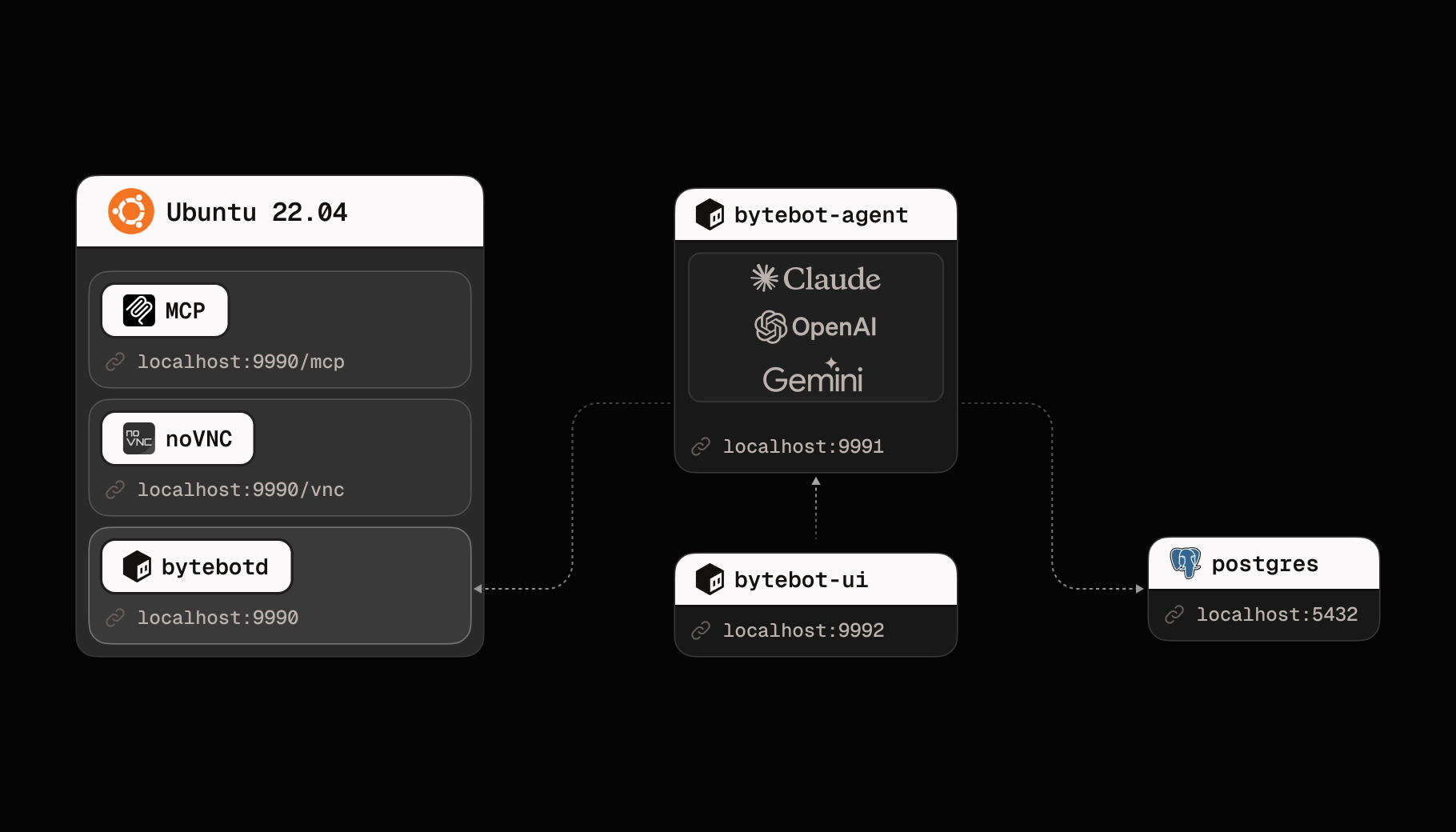 ## System Architecture
The system consists of four main components that work together:
### 1. Bytebot Desktop Container
The foundation of the system - a virtual Linux desktop that provides:
* **Ubuntu 22.04 LTS** base for stability and compatibility
* **XFCE4 Desktop** for a lightweight, responsive UI
* **bytebotd Daemon** - The automation service built on nutjs that executes computer actions
* **Pre-installed Applications**: Firefox ESR, Thunderbird, text editors, and development tools
* **noVNC** for remote desktop access
**Key Features:**
* Runs completely isolated from your host system
* Consistent environment across different platforms
* Can be customized with additional software
* Accessible via REST API on port 9990
* MCP SSE endpoint available at `/mcp`
* Uses shared types from `@bytebot/shared` package
### 2. AI Agent Service
The brain of the system - orchestrates tasks using an LLM:
* **NestJS Framework** for robust, scalable backend
* **LLM Integration** supporting Anthropic Claude, OpenAI GPT, and Google Gemini models
* **WebSocket Support** for real-time updates
* **Computer Use API Client** to control the desktop
* **Prisma ORM** for database operations
* **Tool definitions** for computer actions (mouse, keyboard, screenshots)
**Responsibilities:**
* Interprets natural language requests
* Plans sequences of computer actions
* Manages task state and progress
* Handles errors and retries
* Provides real-time task updates via WebSocket
### 3. Web Task Interface
The user interface for interacting with your AI agent:
* **Next.js 15 Application** with TypeScript for type safety
* **Embedded VNC Viewer** to watch the desktop in action
* **Task Management** UI with status badges
* **WebSocket Connections** for live updates
* **Reusable components** for consistent UI
* **API utilities** for streamlined server communication
**Features:**
* Task creation and management interface
* Desktop tab for direct manual control
* Real-time desktop viewer with takeover mode
* Task history and status tracking
* Responsive design for all devices
### 4. PostgreSQL Database
Persistent storage for the agent system:
* **Tasks Table**: Stores task details, status, and metadata
* **Messages Table**: Stores AI conversation history
* **Prisma ORM** for type-safe database access
## Data Flow
### Task Execution Flow
User describes a task in natural language via the chat UI
Agent service creates a task record and adds it to the processing queue
The LLM analyzes the task and generates a plan of computer actions
Agent sends computer actions to bytebotd via REST API or MCP
bytebotd executes actions (mouse, keyboard, screenshots) on the desktop
Agent receives results, updates task status, and continues or completes
Results and status updates are sent back to the user in real-time
### Communication Protocols
```mermaid theme={null}
graph LR
A[Tasks UI] -->|WebSocket| B[Agent Service]
A -->|HTTP Proxy| C[Desktop VNC]
B -->|REST/MCP| D[Desktop API]
B -->|SQL| E[PostgreSQL]
B -->|HTTPS| F[LLM Provider]
D -->|IPC| G[bytebotd]
```
## Security Architecture
### Isolation Layers
1. **Container Isolation**
* Each desktop runs in its own Docker container
* No access to host filesystem by default
* Network isolation with explicit port mapping
2. **Process Isolation**
* bytebotd runs as non-root user
* Separate processes for different services
* Resource limits enforced by Docker
3. **Network Security**
* Services only accessible from localhost by default
* Can be configured with authentication
* HTTPS/WSS for external connections
### API Security
* **Desktop API**: No authentication by default (localhost only). Supports REST and MCP.
* **Agent API**: Can be secured with API keys
* **Database**: Password protected, not exposed externally
Default configuration is for development. For production:
* Enable authentication on all APIs
* Use HTTPS/WSS for all connections
* Implement network policies
* Rotate credentials regularly
## Deployment Patterns
### Single User (Development)
```yaml theme={null}
Services: All on one machine
Scale: 1 instance each
Use Case: Personal automation, development
Resources: 4GB RAM, 2 CPU cores
```
### Production Deployment
```yaml theme={null}
Services: All services on dedicated hardware
Scale: Single instance (1 agent, 1 desktop)
Use Case: Business automation
Resources: 8GB+ RAM, 4+ CPU cores
```
### Enterprise Deployment
```yaml theme={null}
Services: Kubernetes orchestration
Scale: Single instance with high availability
Use Case: Organization-wide automation
Resources: Dedicated nodes
```
## Extension Points
### Custom Tools
Add specialized software to the desktop:
```dockerfile theme={null}
FROM bytebot/desktop:latest
RUN apt-get update && apt-get install -y \
your-custom-tools
```
### AI Integrations
Extend agent capabilities:
* Custom tools for the LLM
* Additional AI models
* Specialized prompts
* Domain-specific knowledge
## Performance Considerations
### Resource Usage
* **Desktop Container**: \~1GB RAM idle, 2GB+ active
* **Agent Service**: \~256MB RAM
* **UI Service**: \~128MB RAM
* **Database**: \~256MB RAM
### Optimization Tips
1. Allocate sufficient resources to containers
2. Limit concurrent tasks to prevent overload
3. Monitor resource usage regularly
4. Use LiteLLM proxy for provider flexibility
## Next Steps
Learn about the AI agent capabilities
Explore the virtual desktop environment
Integrate with your applications
Deploy your own instance
## System Architecture
The system consists of four main components that work together:
### 1. Bytebot Desktop Container
The foundation of the system - a virtual Linux desktop that provides:
* **Ubuntu 22.04 LTS** base for stability and compatibility
* **XFCE4 Desktop** for a lightweight, responsive UI
* **bytebotd Daemon** - The automation service built on nutjs that executes computer actions
* **Pre-installed Applications**: Firefox ESR, Thunderbird, text editors, and development tools
* **noVNC** for remote desktop access
**Key Features:**
* Runs completely isolated from your host system
* Consistent environment across different platforms
* Can be customized with additional software
* Accessible via REST API on port 9990
* MCP SSE endpoint available at `/mcp`
* Uses shared types from `@bytebot/shared` package
### 2. AI Agent Service
The brain of the system - orchestrates tasks using an LLM:
* **NestJS Framework** for robust, scalable backend
* **LLM Integration** supporting Anthropic Claude, OpenAI GPT, and Google Gemini models
* **WebSocket Support** for real-time updates
* **Computer Use API Client** to control the desktop
* **Prisma ORM** for database operations
* **Tool definitions** for computer actions (mouse, keyboard, screenshots)
**Responsibilities:**
* Interprets natural language requests
* Plans sequences of computer actions
* Manages task state and progress
* Handles errors and retries
* Provides real-time task updates via WebSocket
### 3. Web Task Interface
The user interface for interacting with your AI agent:
* **Next.js 15 Application** with TypeScript for type safety
* **Embedded VNC Viewer** to watch the desktop in action
* **Task Management** UI with status badges
* **WebSocket Connections** for live updates
* **Reusable components** for consistent UI
* **API utilities** for streamlined server communication
**Features:**
* Task creation and management interface
* Desktop tab for direct manual control
* Real-time desktop viewer with takeover mode
* Task history and status tracking
* Responsive design for all devices
### 4. PostgreSQL Database
Persistent storage for the agent system:
* **Tasks Table**: Stores task details, status, and metadata
* **Messages Table**: Stores AI conversation history
* **Prisma ORM** for type-safe database access
## Data Flow
### Task Execution Flow
User describes a task in natural language via the chat UI
Agent service creates a task record and adds it to the processing queue
The LLM analyzes the task and generates a plan of computer actions
Agent sends computer actions to bytebotd via REST API or MCP
bytebotd executes actions (mouse, keyboard, screenshots) on the desktop
Agent receives results, updates task status, and continues or completes
Results and status updates are sent back to the user in real-time
### Communication Protocols
```mermaid theme={null}
graph LR
A[Tasks UI] -->|WebSocket| B[Agent Service]
A -->|HTTP Proxy| C[Desktop VNC]
B -->|REST/MCP| D[Desktop API]
B -->|SQL| E[PostgreSQL]
B -->|HTTPS| F[LLM Provider]
D -->|IPC| G[bytebotd]
```
## Security Architecture
### Isolation Layers
1. **Container Isolation**
* Each desktop runs in its own Docker container
* No access to host filesystem by default
* Network isolation with explicit port mapping
2. **Process Isolation**
* bytebotd runs as non-root user
* Separate processes for different services
* Resource limits enforced by Docker
3. **Network Security**
* Services only accessible from localhost by default
* Can be configured with authentication
* HTTPS/WSS for external connections
### API Security
* **Desktop API**: No authentication by default (localhost only). Supports REST and MCP.
* **Agent API**: Can be secured with API keys
* **Database**: Password protected, not exposed externally
Default configuration is for development. For production:
* Enable authentication on all APIs
* Use HTTPS/WSS for all connections
* Implement network policies
* Rotate credentials regularly
## Deployment Patterns
### Single User (Development)
```yaml theme={null}
Services: All on one machine
Scale: 1 instance each
Use Case: Personal automation, development
Resources: 4GB RAM, 2 CPU cores
```
### Production Deployment
```yaml theme={null}
Services: All services on dedicated hardware
Scale: Single instance (1 agent, 1 desktop)
Use Case: Business automation
Resources: 8GB+ RAM, 4+ CPU cores
```
### Enterprise Deployment
```yaml theme={null}
Services: Kubernetes orchestration
Scale: Single instance with high availability
Use Case: Organization-wide automation
Resources: Dedicated nodes
```
## Extension Points
### Custom Tools
Add specialized software to the desktop:
```dockerfile theme={null}
FROM bytebot/desktop:latest
RUN apt-get update && apt-get install -y \
your-custom-tools
```
### AI Integrations
Extend agent capabilities:
* Custom tools for the LLM
* Additional AI models
* Specialized prompts
* Domain-specific knowledge
## Performance Considerations
### Resource Usage
* **Desktop Container**: \~1GB RAM idle, 2GB+ active
* **Agent Service**: \~256MB RAM
* **UI Service**: \~128MB RAM
* **Database**: \~256MB RAM
### Optimization Tips
1. Allocate sufficient resources to containers
2. Limit concurrent tasks to prevent overload
3. Monitor resource usage regularly
4. Use LiteLLM proxy for provider flexibility
## Next Steps
Learn about the AI agent capabilities
Explore the virtual desktop environment
Integrate with your applications
Deploy your own instance