> ## Documentation Index
> Fetch the complete documentation index at: https://docs.bytebot.ai/llms.txt
> Use this file to discover all available pages before exploring further.
# Introduction
> Open source AI desktop agent that automates any computer task


## What is Bytebot?
Bytebot is an open-source AI agent that can control a computer desktop to complete tasks for you. It runs in Docker containers on your own infrastructure, giving you a virtual assistant that can:
* Use any desktop application (browser, email, office tools, etc.)
* Process uploaded files including PDFs, spreadsheets, and documents
* Read entire files directly into the LLM context for rapid analysis
* Automate repetitive tasks like data entry and form filling
* Handle complex workflows that span multiple applications
* Work 24/7 without human supervision
Simply describe what you need done in plain English, and Bytebot will figure out how to do it – clicking buttons, typing text, navigating websites, reading documents, and completing tasks just like a human would.
## Why Bytebot Over Traditional RPA?
Unlike UiPath or similar tools, no need to design flowcharts or write scripts - just describe tasks naturally
AI-powered understanding means Bytebot adapts to UI changes without breaking
Can read and understand any interface, not just pre-mapped elements
Handles unexpected popups, errors, and variations automatically
## Why Self-Host Bytebot?
Your tasks and data never leave your infrastructure. Everything runs locally
on your servers.
Customize the desktop environment, install any applications, and configure
to your exact needs.
Use your own LLM API keys without platform restrictions or additional fees.
Each desktop runs in its own container, completely isolated from your host
system.
## Real-World Use Cases
### Enterprise Automation (RPA Replacement)
Bytebot is the next generation of RPA (Robotic Process Automation). It handles the same complex workflows as traditional tools like UiPath, but with AI-powered adaptability and automatic authentication:
* **Financial Operations**: Automate banking portal access (including 2FA when password manager extensions are configured), download transaction files, and process them through multiple systems
* **Compliance Workflows**: Navigate government websites, download regulatory documents, extract data, and update compliance tracking systems
* **Multi-System Integration**: Bridge legacy systems that lack APIs by automating the UI interactions between them
* **Vendor Management**: Log into supplier portals, download invoices, reconcile with internal systems, and process payments
### Business Process Automation
* **Data Reconciliation**: Pull reports from multiple SaaS platforms, cross-reference data, and generate consolidated reports
* **Customer Onboarding**: Navigate between CRM, banking, and verification systems to complete new customer setup
* **Purchase Order Processing**: Extract POs from webmail portals, enter into ERP systems, and update inventory databases
* **HR Operations**: Collect employee data from various systems, update records, and ensure consistency across platforms
### Development & QA Integration
Bytebot becomes even more powerful when combined with coding agents:
* **Full-Stack Testing**: Use a coding agent to generate code, then have Bytebot visually test and validate the output
* **Automated Debugging**: Let Bytebot reproduce user-reported issues while a coding agent analyzes and fixes the code
* **End-to-End Development**: Code agents write features, Bytebot tests them, creating a complete development loop
* **Visual Regression Testing**: Automatically detect UI changes across deployments with screenshot comparisons
## How It Works
Simply tell Bytebot what you want done in natural language through the tasks
interface
Bytebot understands your request and breaks it down into specific computer
actions
Bytebot executes the task on its virtual desktop using the keyboard
and mouse
Monitor it working in real-time through the task detail view, or let it
complete tasks independently.
Receive the completed task output, screenshots, or confirmation of
completion
## Architecture Overview
Bytebot consists of four integrated components working together:
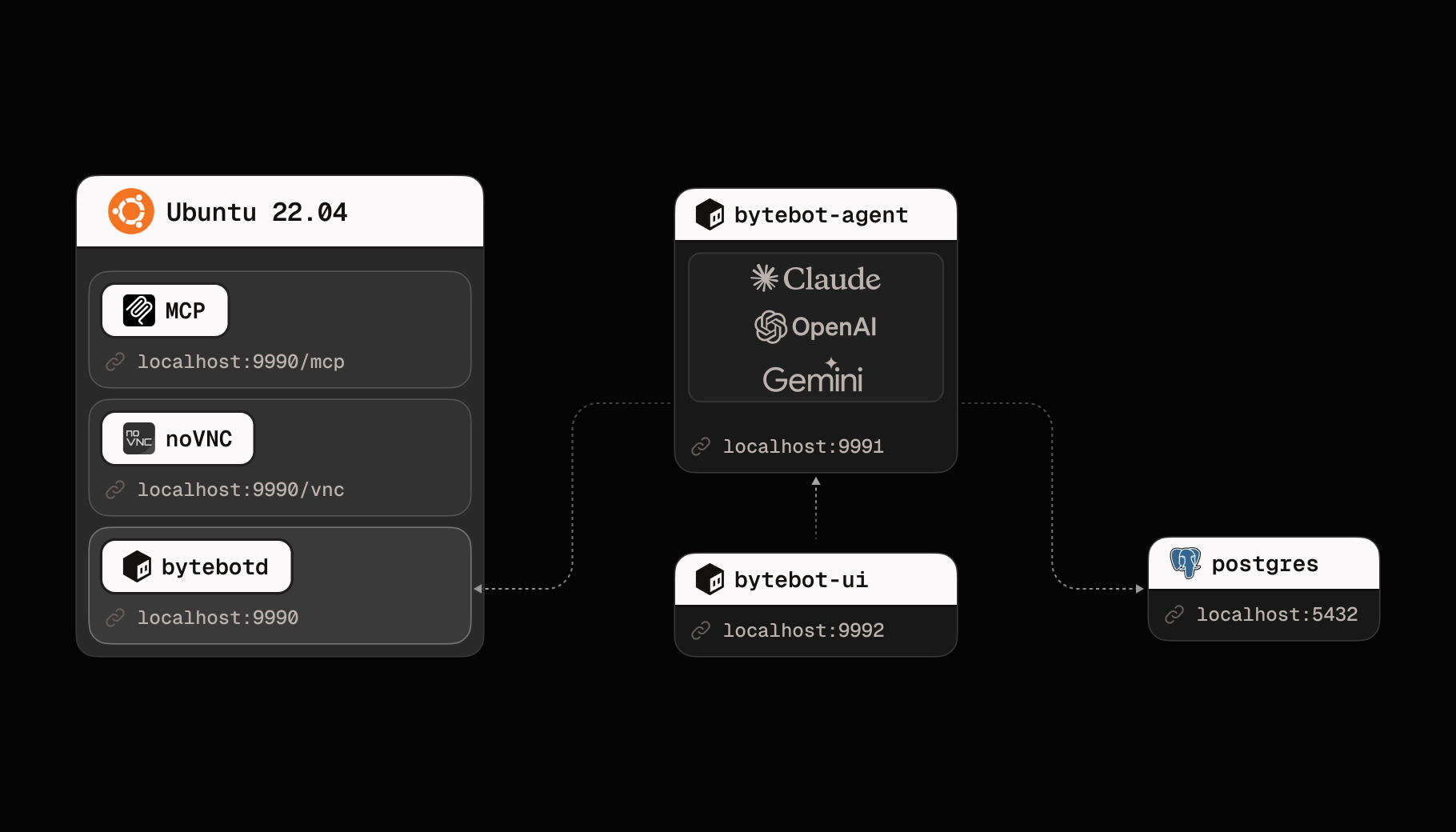 Ubuntu 22.04 with XFCE4, VSCode, Firefox, Thunderbird email client, and automation daemon (bytebotd)
NestJS service that uses LLMs (Anthropic Claude, OpenAI GPT, Google Gemini) to plan and execute tasks
Next.js web app for creating and managing tasks
Programmatic access to both task management and direct desktop control
## Getting Started
Get Bytebot running in 2 minutes
Understand how it all fits together
Integrate with your applications
## Key Features
### 🤖 Natural Language Control
Just tell Bytebot what you need done. No coding or complex automation tools required.
### 🖥️ Full Desktop Access
Bytebot can use any application you can install - browsers, office tools, custom software.
### 🔒 Complete Privacy
Runs entirely on your infrastructure. Your data never leaves your servers.
### 🔄 Two Operating Modes
* **Autonomous Mode**: Bytebot completes tasks independently
* **Takeover Mode**: You can step in and take control when needed
### 🖱️ Direct Desktop Access
* **Desktop Tab**: Free-form access to the virtual desktop for setup, installing programs, or manual operations
* **Task View**: Watch and interact with Bytebot during task execution
### 🚀 Easy Deployment
* One-click deployment on Railway
* Docker Compose for self-hosting
* Helm charts for Kubernetes
### 🔌 Developer-Friendly
* REST APIs for programmatic control
* Task management API
* Extensible architecture
* MCP (Model Context Protocol) support
## Community & Support
Join our community for help, tips, and discussions
Report issues, contribute, or star the project
**Ready to give your AI its own computer?** Start with our [Quick Start
Guide](/quickstart) to have your own AI desktop agent running in minutes.
Ubuntu 22.04 with XFCE4, VSCode, Firefox, Thunderbird email client, and automation daemon (bytebotd)
NestJS service that uses LLMs (Anthropic Claude, OpenAI GPT, Google Gemini) to plan and execute tasks
Next.js web app for creating and managing tasks
Programmatic access to both task management and direct desktop control
## Getting Started
Get Bytebot running in 2 minutes
Understand how it all fits together
Integrate with your applications
## Key Features
### 🤖 Natural Language Control
Just tell Bytebot what you need done. No coding or complex automation tools required.
### 🖥️ Full Desktop Access
Bytebot can use any application you can install - browsers, office tools, custom software.
### 🔒 Complete Privacy
Runs entirely on your infrastructure. Your data never leaves your servers.
### 🔄 Two Operating Modes
* **Autonomous Mode**: Bytebot completes tasks independently
* **Takeover Mode**: You can step in and take control when needed
### 🖱️ Direct Desktop Access
* **Desktop Tab**: Free-form access to the virtual desktop for setup, installing programs, or manual operations
* **Task View**: Watch and interact with Bytebot during task execution
### 🚀 Easy Deployment
* One-click deployment on Railway
* Docker Compose for self-hosting
* Helm charts for Kubernetes
### 🔌 Developer-Friendly
* REST APIs for programmatic control
* Task management API
* Extensible architecture
* MCP (Model Context Protocol) support
## Community & Support
Join our community for help, tips, and discussions
Report issues, contribute, or star the project
**Ready to give your AI its own computer?** Start with our [Quick Start
Guide](/quickstart) to have your own AI desktop agent running in minutes.